When business owners think about WordPress security, one of the first questions I often hear is:
“What is the best security plugin?”
It is an understandable question, but after more than 18 years working in web development, I believe it starts the conversation in the wrong place.
A quality security plugin can absolutely be an important part of protecting a WordPress website. It can provide useful monitoring, login protection, alerts, scanning, firewall capabilities, and other safeguards.
But a security plugin should be one layer of your security—not the entire security strategy.
A secure WordPress website starts much deeper than that.
It starts with how the website is built, where it is hosted, how the code is written, which themes and plugins are trusted, how access is controlled, how updates are handled, how backups are managed, and what happens if one of those layers fails.
That is what I mean when I talk about building security from the root up.
There Is No Such Thing as a Completely Unbreakable Website
One of the most important things business owners should understand about website security is that nobody can honestly promise a website will be 100% impossible to compromise.
WordPress itself describes security as risk reduction rather than risk elimination. The goal is to use appropriate controls to reduce your exposure and make the overall system harder to compromise.
The OWASP Foundation, one of the most respected organizations in application security, makes the same point: no application can be guaranteed to remain completely secure against every possible attack.
That means good security isn’t about finding one product with a big “SECURE” button.
It is about making sure an attacker does not have one easy path through your entire website.
Any Plugin Can Potentially Have a Vulnerability
WordPress plugins are software.
Themes are software.
WordPress itself is software.
Your hosting environment runs software.
Software changes, vulnerabilities are discovered, and security practices continue to evolve.
WordPress specifically maintains security guidance for plugin developers covering areas such as user capabilities, data validation, nonces, output escaping, and input sanitization because code outside WordPress core must also be developed securely.
So simply installing a security plugin does not suddenly make every other component of a website safe.
Even the security plugin itself is still software.
That does not mean you should avoid security plugins. It means you should never rely on one plugin as your only line of defense.
If one security control fails, another should still be standing behind it.
That principle is commonly called defense in depth.
OWASP defines defense in depth as using multiple security controls so that if one layer is inadequate or bypassed, another layer can help prevent a complete compromise.
That is exactly how I believe a professional WordPress website should be approached.
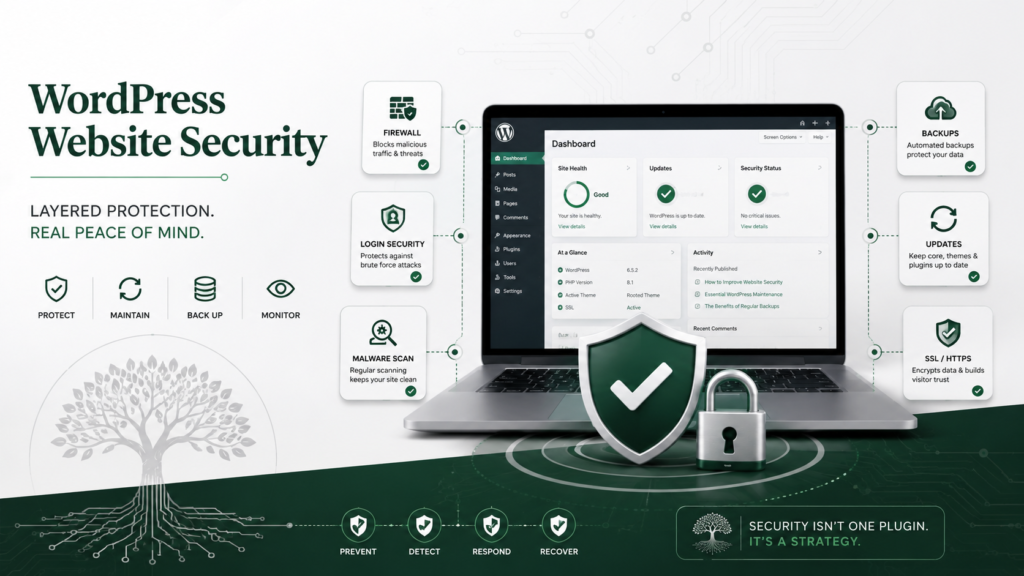
Think of WordPress Security as Layers
Instead of asking:
“Which security plugin should I install?”
I would rather ask:
“How many layers would someone have to get through before they could seriously damage this website?”
A strong WordPress security strategy may look something like this.
Layer 1: A Solid Hosting Environment
Your website begins with the server underneath it.
You can build a great WordPress website and still create unnecessary risk by placing it on poorly maintained infrastructure.
WordPress’s own hardening documentation recommends starting with the hosting environment and points to current server software, backup and recovery capabilities, and a clear understanding of where the host’s security responsibility ends and yours begins.
A good foundation matters.
If the root of the system is weak, adding another plugin at the top does not magically fix the foundation underneath it.
Layer 2: Keep WordPress, Themes and Plugins Updated
Updates are not just about receiving new features.
They frequently contain bug fixes, compatibility improvements, and security fixes.
WordPress specifically recommends keeping plugins and themes on their latest versions as part of maintaining site security.
When a security issue becomes publicly known, outdated software can become an easier target because information about the vulnerability may already be available.
That makes maintaining a website an important part of securing one.
A website should not be built, launched, and forgotten.
Layer 3: Use Trusted, Well-Built Software
Every plugin added to a WordPress installation becomes part of that website’s software environment.
That does not mean fewer plugins automatically equals a secure website.
It means every additional component should have a reason to exist.
I look at questions such as:
- Is the software actively maintained?
- Does it come from a source I trust?
- Is the developer continuing to release updates?
- Does it duplicate functionality already on the website?
- Does it request more access than it actually needs?
- Is the code being developed with modern WordPress practices?
- Is the product still compatible with the current WordPress environment?
WordPress recommends obtaining themes and plugins from trusted sources rather than downloading them from unknown locations.
Good security often involves reducing unnecessary complexity and unnecessary entry points.
Layer 4: Build Themes and Plugins Securely
This is the part that happens before the business owner ever installs the product.
Developers have a responsibility too.
When I build software for WordPress, security should not simply be something added at the end after the product already works.
It should influence how the product is designed.
WordPress provides specific development practices around validating data, sanitizing input, escaping output, checking user capabilities, and using nonces where appropriate.
OWASP refers to the broader principle as security by design: security requirements should be incorporated into the design and development process rather than treated as an afterthought.
That philosophy is extremely important to me.
A plugin can have hundreds of features, but if those features are built carelessly, the feature count means very little.
I would rather build something purposeful, maintainable, understandable, and secure than add unnecessary complexity simply to make a feature list longer.
Layer 5: Protect User Accounts and Access
Many website compromises do not require somebody to perform some incredibly sophisticated attack.
Sometimes they simply need access to an account that has too much permission.
Strong passwords matter. Two-step authentication adds another layer. User accounts should also receive only the permissions they actually need.
WordPress recommends strong passwords and specifically identifies two-step authentication as an additional security measure.
OWASP also recommends the principle of least privilege—giving a user or process only the minimum access necessary to perform its job.
If somebody only needs to write blog posts, they usually do not need complete administrator access.
Limiting permissions also limits what can potentially be damaged if an account is ever compromised.
Layer 6: Protect the Files and Database
Proper permissions are another layer that many website owners never see.
A WordPress website contains files that should not simply be writable by everything on the server.
WordPress’s hardening recommendations advise restricting file permissions as much as practical and specifically note that plugin files should generally be writable only by the appropriate user account.
This is another example of security happening underneath the visible website.
Visitors never see file permissions.
They never see database privileges.
They never see server configuration.
But those things can be every bit as important as the security badge displayed inside the WordPress dashboard.
Layer 7: Backups Are Part of Security
Backups sometimes get classified as maintenance instead of security.
I consider them part of both.
A backup may not prevent an attack, but it can dramatically affect your ability to recover from one.
WordPress recommends regularly backing up the database and maintaining trusted snapshots of the WordPress installation so that clean copies may be available if a compromise is discovered later.
And simply having a backup file somewhere is not enough.
A professional backup strategy should answer:
Where are the backups stored?
How often are they created?
How many versions are retained?
Can they actually be restored?
Are they separated enough from the live website that an incident cannot destroy both?
Security is not only about prevention.
It is also about recovery.
Layer 8: Monitoring and Logging
You also need some ability to recognize when something unusual is happening.
Logs can provide information about attempted attacks, changes, access activity, and other events that can become important when diagnosing a security problem.
WordPress’s hardening guidance specifically discusses logging and monitoring as part of a broader security strategy.
That is where a good security plugin or outside monitoring system can become extremely useful.
It becomes another set of eyes watching the website.
But notice where it sits in this discussion.
It is part of the system—not the entire system.
So Do You Still Need a WordPress Security Plugin?
In many cases, yes.
I am not against WordPress security plugins at all.
A good one can provide valuable tools and automate protections that would otherwise require more technical configuration.
What I am against is the idea that installing one means the security conversation is finished.
Imagine a building with an expensive alarm system but:
- The back door does not lock.
- Former employees still have keys.
- Nobody maintains the building.
- The security cameras stopped recording six months ago.
- There is no backup plan if something happens.
- Nobody knows who has access to what.
Would you call that building secure simply because it has a great alarm?
Probably not.
A WordPress website is not much different.
Stability and Security Often Go Together
Something else I have learned throughout my career is that many of the practices that make a website more secure also tend to make it easier to maintain.
Keeping the software environment controlled.
Avoiding unnecessary plugins.
Using well-maintained code.
Following WordPress standards.
Limiting permissions.
Keeping dependable backups.
Testing updates.
Monitoring the system.
Understanding what each component actually does.
Those practices create a website that is not only harder to compromise but generally easier to troubleshoot, maintain, update, and support.
That stability is especially important for small businesses.
A business owner should be able to concentrate on customers and running the company—not constantly worry about whether the website underneath the business is falling apart.
How I Approach Security at Rooted Dev Studio
One of the principles behind Rooted Dev Studio is that security should begin with the way products are built.
I do not believe in promising that any theme, plugin, or website is magically “unhackable.”
I believe in something much more practical:
Build responsibly. Reduce unnecessary risk. Use multiple layers. Maintain those layers. And always have a recovery plan.
The themes, plugins, and tools I build are backed by more than 18 years of web-development experience, and that experience has taught me that professional development isn’t only about making something look good or adding another feature.
It is about thinking about what happens behind the screen too.
How is information handled?
Who should be able to perform an action?
What happens when something unexpected is submitted?
What happens if another component fails?
Can the product be updated safely?
Can the website recover if something goes wrong?
Those are the questions that create a stronger foundation.
Security Should Be Built From the Root Up
There will never be one plugin that replaces responsible website development.
There will never be one setting that eliminates every possible vulnerability.
And there will never be a point where a website becomes so secure that maintenance is no longer necessary.
Security is an ongoing process.
The strongest WordPress websites are built around layers—hosting, secure development, trusted software, updates, access controls, appropriate permissions, backups, monitoring, and security tools all working together.
A security plugin can strengthen that system.
But it should never have to be the system.
That is the approach I believe in at Rooted Dev Studio:
Build the foundation correctly. Protect it in layers. Maintain it responsibly.
Built from experience. Rooted in better code.